The Google Ads Editor Revolution
If you've ever managed Google Ads campaigns at scale, you know Google Ads Editor. It's a free desktop application that lets you:
- Download all your campaigns to work on them locally
- Make bulk changes across thousands of keywords in seconds
- Work offline without losing your changes
- Review everything before pushing changes live
- Copy and paste campaigns between accounts
Google Ads Editor is so essential that it's hard to imagine managing large Google Ads accounts without it. Agencies use it daily. Enterprise advertisers rely on it. It's become the standard workflow for professional PPC management.
The key insight: Google Ads Editor doesn't try to automate your decisions. It gives you the power to execute your decisions faster. That's a fundamentally different approach than most advertising tools.
The Amazon Advertising Gap
Amazon's advertising platform has grown massively. Sponsored Products, Sponsored Brands, Sponsored Display, Streaming TV ads — it's a full-featured ad platform now. But the tools haven't kept up.
Here's what Amazon advertisers currently deal with:
The Bulksheet Workflow
Amazon's official solution for bulk editing is "Bulk Operations" — download a spreadsheet, edit it in Excel, upload it back, fix the errors, repeat. It's clunky, error-prone, and slow. A workflow that should take 5 minutes takes 30.
The Web Interface
Amazon's web console times out. It loses your work. Making the same change to 100 campaigns means clicking through 100 campaign pages. There's no concept of "stage changes and review before applying."
Third-Party Tools
Most Amazon PPC tools focus on automation — AI bid optimization, rule-based adjustments, automated keyword harvesting. That's useful for some advertisers, but it's not what everyone needs. Sometimes you just need to change 500 bids by 10%, review the changes, and push them live. You don't need AI for that. You need a good editor.
And these tools cost $200-$10,000/month. For bulk editing capabilities that Google gives away for free.
What Google Ads Editor Does Right
Google Ads Editor succeeds because it respects how professional advertisers actually work:
| Feature | Why It Matters |
|---|---|
| Offline mode | Work on planes, in cafes, anywhere. Your changes are saved locally. |
| Bulk editing | Select 1,000 keywords, change all their bids in one operation. |
| Change staging | See all pending changes before they go live. Revert anything. |
| Copy/paste | Duplicate campaigns, copy between accounts, clone structures. |
| Find and replace | Update naming conventions across your entire account. |
| No AI required | You make the decisions. The tool executes them fast. |
Building the Google Ads Editor for Amazon
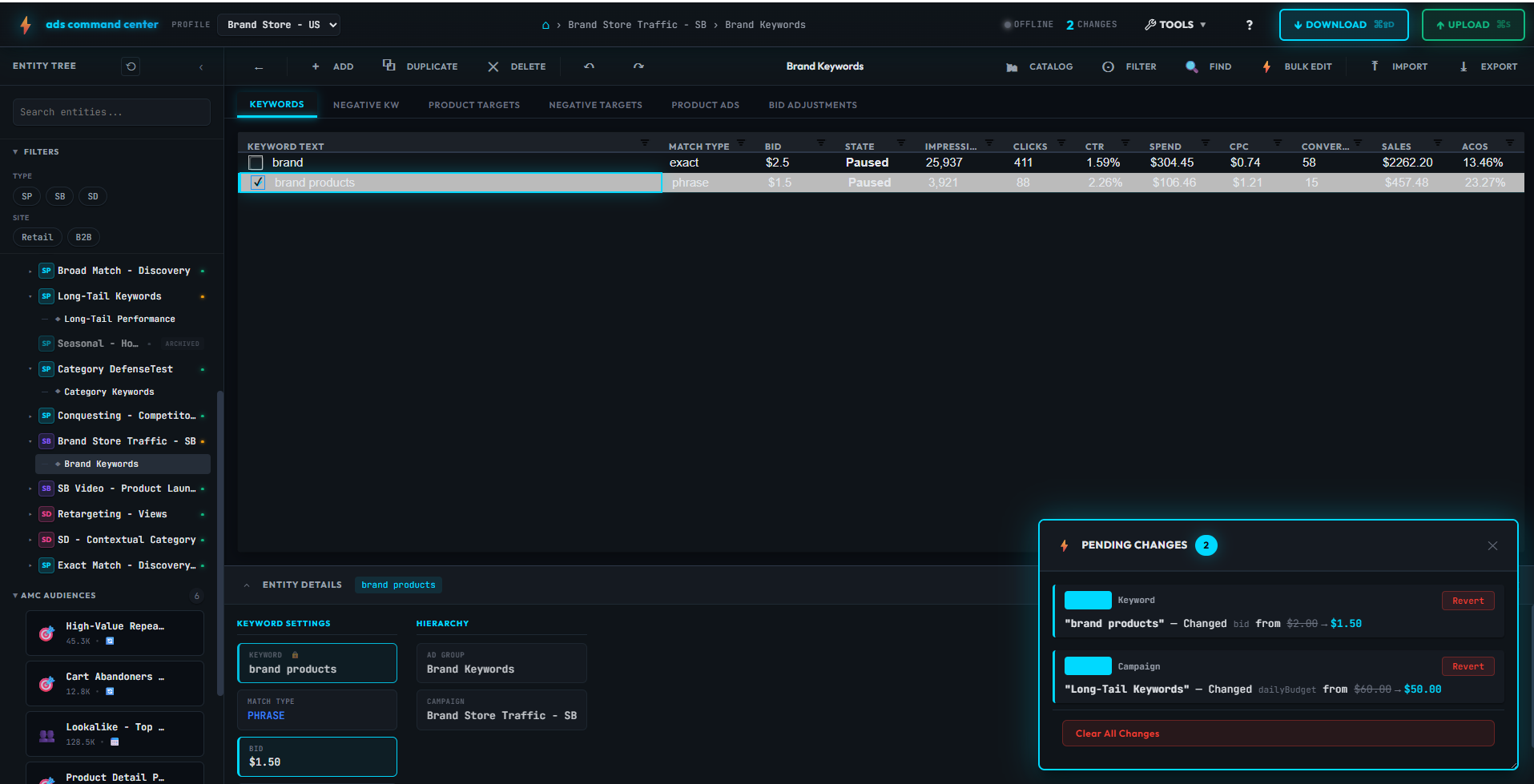
That's exactly what ads command center is. A desktop application that brings the Google Ads Editor workflow to Amazon advertising.
Same Philosophy
- Download your data: Pull all your SP, SB, SD, and Streaming TV campaigns locally
- Edit at scale: Change bids, states, budgets, keywords across thousands of entities
- Work offline: No timeouts. No lost work. Your data is on your machine.
- Review before upload: See every pending change. Revert anything. Push when ready.
- Copy between accounts: Clone campaigns across profiles with automatic currency conversion
Amazon-Specific Features
We also added features that Amazon advertisers specifically need:
- Revive archived campaigns: Amazon won't let you un-archive campaigns. We let you clone them back to life with all structure intact.
- Search Term Miner: Analyze search term reports, promote winners, negate wasted spend — all in one interface.
- Audience browser: Browse Amazon's 8,000+ pre-built audience segments for SD targeting.
- Analytics dashboard: Visualize performance trends across all ad types.
Who This Is For
ads command center is built for advertisers who:
- Manage more than a handful of campaigns
- Want control over their optimization decisions
- Are frustrated with bulksheet workflows
- Don't want to pay $500/month for basic bulk editing
- Appreciate what Google Ads Editor does for Google campaigns
If you're looking for AI to run your campaigns for you, there are other tools for that. If you want the power to run your campaigns yourself — faster — that's what we built.
Ready to try it?
ads command center is currently in beta. Join the waitlist for early access.
Join the WaitlistThe Bottom Line
Google Ads Editor proved that advertisers want powerful, fast, offline-capable editing tools. Amazon advertisers have been waiting for the same thing.
We're building it.
ads command center — the Google Ads Editor for Amazon.